


Simply Wall St
4.5530.00 Reviews
App Specs
- Version
- 2.15.0
- Updated On
- License
- Free
- Downloads
- 500,000+
- Developer
- Simply Wall St
- Categories
- Finance
- Platform
- Android
Screenshots
 Analysis by AppCompare
When a stock app feels crowded with charts, headlines and numbers, the hard part is often not finding information but knowing what to do with it. I find Simply Wall St most useful as a way to organize company research and keep an eye on a portfolio, rather than as a button that tells me which trade to make. It is a free finance app from Simply Wall St, with optional in-app purchases ranging from $0.49 to $259.99 per item. Its 4.6 average from around 8,400 ratings suggests that many users find the approach useful, but it still takes a little care to turn a visual summary into a sound decision.
Where the first snags tend to appear
The initial appeal is easy to understand: a company’s financial picture is presented in a way that feels less forbidding than a wall of accounting terms. The possible snag is that an approachable display can make analysis look more conclusive than it is. I treat the visuals as a starting point for questions, not as a verdict on whether a stock is a bargain or a safe holding. A company can look attractive on one measure and still face risks that matter to my own plans.
That distinction is especially important when I am new to a company. Before acting, I want to know what the business does, what might change its prospects, and whether the assumptions behind a valuation seem reasonable. The app can help me find and arrange relevant information, but it cannot decide how much risk I can afford or whether a particular investment fits my circumstances. If you want a simple buy-or-sell instruction, this research style may feel indirect.
Another point to check early is whether the app’s presentation matches the question I actually have. A portfolio overview is useful for monitoring holdings; a company analysis is better for investigating a possible purchase; and a market alert is most useful when I already know what event or price change deserves my attention. Opening the app without a particular purpose can leave me browsing attractive visuals without learning anything actionable.
Setup checks that make research easier
I would begin with a small, deliberate setup rather than trying to follow every company that catches my eye. Add holdings you actually own to the portfolio, then keep possible future investments separate in a watchlist. That simple distinction makes it easier to tell the difference between monitoring exposure and researching an idea. It also helps prevent a long list of interesting tickers from being mistaken for a plan.
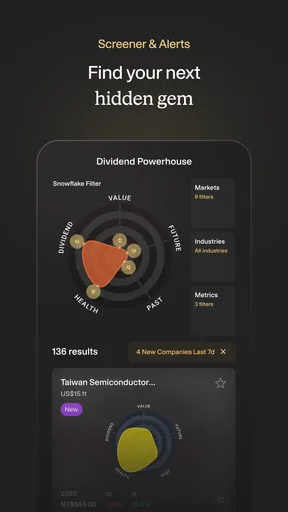
When reviewing a company, I use the Snowflake view as a prompt to inspect its five areas—value, future growth, past performance, financial health and income—rather than as a score to follow blindly. If one area looks notably different from the others, I pause there and ask why it might matter to the company. This is a more useful habit than glancing at the overall shape and moving on. A tidy summary is valuable precisely because it helps me spot what deserves a closer read.
It is also worth setting expectations about cost before building a routine around features you may not need. The app is free to download, and optional purchases are available, but I would first see whether its no-cost tools answer my actual questions. There is no reason to pay simply because a deeper view exists; the right test is whether it helps you understand a decision better than the information you already use. The app is rated for Everyone, though that age label should not be confused with investment advice being suitable for every person.
Worth Reading Before You Choose

EA SPORTS FC Mobile 26 Is a Bigger Football Game, but It Takes Time

Flipboard Shows What News Apps Must Do Beyond the Feed

Switching to Android Auto Means Rethinking Your Driving Routine

Google Calendar Makes a Crowded Week Easier to Manage

Ludo King Makes the Most of the Minutes Between Plans

Baby Panda World Brings Quick Play to Modern Phones, but Its Game Library Feels Busy
Recovering a useful workflow when research gets messy
When I lose track of why I saved a company, I find it helpful to return to the original question: was I checking a holding, comparing a possible investment, or waiting for a development? Then I review only the relevant part of the company’s picture and note what would change my mind. This keeps a watchlist from turning into a collection of names I check out of habit. It also makes alerts more meaningful, because I can connect a notification to a question I already care about.
If a summary seems surprising, I do not immediately assume the app is wrong or that I have found a hidden opportunity. I first check that I am looking at the intended company, then compare the different areas of the analysis and look for a sensible explanation for the contrast. A strong past record, for instance, does not automatically answer a question about future growth; each part concerns a different aspect of the business. Taking a moment to separate those questions is a practical way to avoid overreacting to a single visual cue.
The same discipline helps with portfolio tracking. A daily move can be emotionally loud but not especially important to a long-term plan. I use a portfolio view to notice changes and ask whether anything fundamental has altered, rather than treating every movement as a reason to trade. That approach will not suit someone who wants to make rapid, frequent decisions from a stream of market activity. For me, the app works better as a research desk than as a trading cockpit.
When the app may not be the cause
Not every frustrating session points to a problem with the app itself. Sometimes the real issue is that I have not decided what I want to find out, or that I am expecting one screen to answer questions requiring more context. If the information feels confusing, I step back and define the decision in plain language. Am I assessing a business, checking what I own, or trying to understand a market development? That reset often makes the next step clearer than opening more sections at random.
It also helps to distinguish research from execution. Simply Wall St is built around portfolio tracking, company analysis, research and alerts; I would not choose it as my only tool if my main need were placing trades or watching a broker’s order process. A brokerage app is a more natural home for transactions, while a general market app may be quicker for a simple quote check. Those tools can complement this one rather than compete with it.
Finally, I would avoid treating curated financial news as a complete account of what is happening. News can point me toward a development worth investigating, but a headline alone rarely explains how it affects a particular company or my portfolio. I prefer to use it as a lead, then return to the underlying business and the reason I am following the stock. That extra step makes the information more useful and reduces the chance that an attention-grabbing update drives an impulsive decision.
Simply Wall St has been available since April 19, 2016, and its current version is 2.15.0, with a minimum operating-system requirement of 7.1. It has passed 500,000 installs, which gives a prospective user a sense of its reach, though popularity by itself does not prove that its methods suit every investor. I see its main value in making company research approachable and giving a portfolio owner a more organized way to revisit holdings. The main limitation is the same one that comes with any condensed analysis: a clean presentation cannot replace judgment, background reading or a clear personal plan.
For everyday use, I can imagine checking a holding over breakfast, noticing a change that deserves attention, and saving a possible investment to revisit later rather than rushing into a trade. That is a realistic strength: the app can support a repeatable research habit without requiring me to build every view from scratch. But if I were only looking for a quick price, a place to execute an order, or a plain spreadsheet-style record, I would use a more focused alternative. I would also skip it if I expected an app to guarantee returns or tell me what to buy. Its best role is helping me ask better questions, not making decisions in my place.
If you’ve ever dipped your toes into the stock market, you know how overwhelming it can be. That's where Simply Wall St comes in. This app has been making waves as a go-to tool for investors, whether you're a newbie or a seasoned pro. So, I decided to dive in and give it a whirl. Here's my take on Simply Wall St.
Getting Started: First Impressions
Right off the bat, Simply Wall St impresses with its sleek, user-friendly interface. Signing up is a breeze, and once you're in, the app greets you with a colorful dashboard filled with eye-catching visuals. The design is intuitive, making it easy for users to navigate through the plethora of features.
One of the standout features is the "Snowflake" analysis. This unique visual representation of a company's financial health is broken down into five key areas: value, future growth, past performance, financial health, and income. It's like having a financial advisor in your pocket, minus the jargon.
Diving Deeper: Features Galore
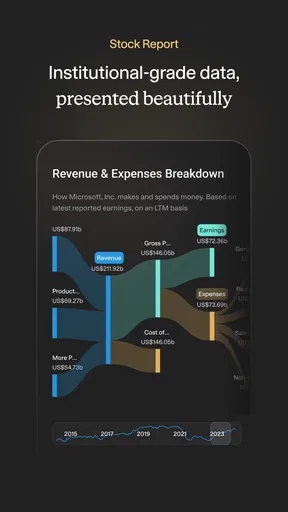
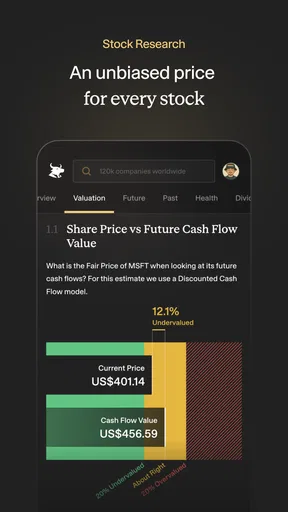
Now, let’s talk about what makes this app a potential game-changer for investors. The sheer amount of data available is mind-boggling. You get access to detailed financial analyses, company metrics, and stock valuations. It’s like peeling back the layers of a company to see what’s really going on under the hood.
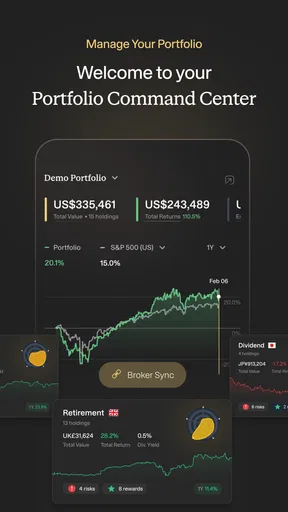
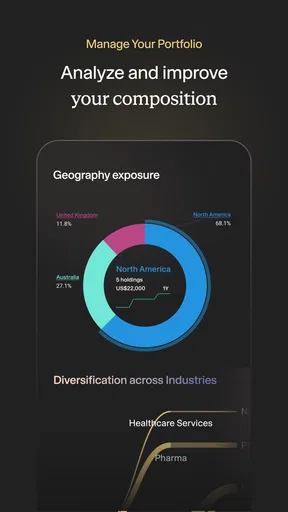
The "Portfolio" feature is another gem. You can create and manage your investment portfolio, track performance, and even get personalized insights based on your holdings. This is especially helpful for keeping tabs on your investments without getting bogged down by spreadsheets.
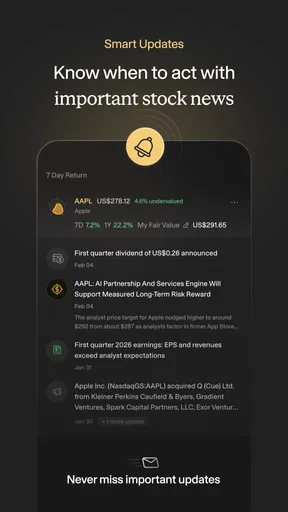
For those who love to keep their finger on the pulse of the market, the "News" section curates the latest financial news and updates. It's a handy feature that ensures you stay informed about any developments that could impact your investments.
Real-World Application: How It Stacks Up
Using Simply Wall St in real-time scenarios is where it truly shines. Whether you're looking to buy, hold, or sell stocks, the app provides a solid foundation for making informed decisions. The "Watchlist" feature allows you to keep an eye on potential investments, with real-time updates that help you strike while the iron is hot.
One of the things I appreciate most about this app is its ability to cater to both novice and experienced investors. If you're new to investing, the in-app tutorials and guides are incredibly helpful. Meanwhile, seasoned traders can dive into complex data and analyses to fine-tune their strategies.
The Verdict: Is It Worth It?
In a nutshell, Simply Wall St is a powerhouse app that simplifies the complexities of investing. Its combination of user-friendly design and detailed financial insights makes it a must-have for anyone serious about growing their wealth. While it does come with a premium option for those who want even more in-depth analysis, the free version offers plenty of value for most users.
So, if you're ready to take control of your investments and make smarter financial decisions, Simply Wall St might just be the tool you’ve been waiting for. It’s like having a financial guru in your pocket, guiding you every step of the way. And trust me, navigating the market has never felt this empowering.
Pros
- User-friendly interface and design.
- Comprehensive stock analysis features.
- Regular updates with new data.
- Customizable watchlists and alerts.
- Detailed company financial summaries.
Cons
- Some features require a premium subscription.
- Limited to stock market insights only.
- May overwhelm beginners with data.
- Occasional lag in data updates.
- No support for cryptocurrency analysis.
FAQs for Simply Wall St
What is Simply Wall St and how does it work?
Simply Wall St is an app designed to help investors make informed decisions by providing detailed stock analysis and financial data visualization. It simplifies complex financial information into easy-to-understand infographics, allowing users to evaluate investment opportunities efficiently. The app covers a wide range of stocks from various markets, making it a versatile tool for both novice and experienced investors.
Is Simply Wall St suitable for beginner investors?
Yes, Simply Wall St is particularly user-friendly, making it a great tool for beginner investors. Its visual approach to financial data helps users understand complex concepts without needing extensive financial knowledge. Additionally, the app offers educational resources and tutorials to guide new investors through the basics of stock analysis and investing.
What features does Simply Wall St offer?
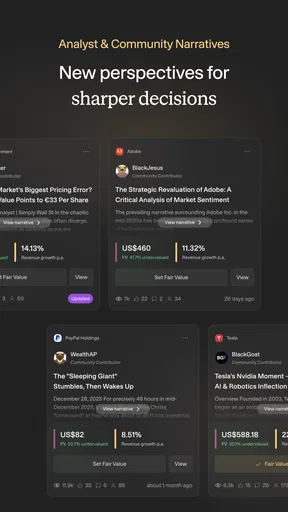
Simply Wall St offers a variety of features including stock analysis, portfolio management, and market insights. Users can explore detailed company reports, view financial health checks, and track their investment portfolios. The app also updates users with personalized news and alerts, helping them stay informed about market trends and their investments.
Does Simply Wall St require a subscription?
Simply Wall St offers both free and paid subscription plans. The free version provides access to basic features and limited stock analysis, while the premium subscription offers more comprehensive insights, advanced portfolio management tools, and additional data points. Users can choose the plan that best suits their investment needs and budget.
How secure is my data with Simply Wall St?
Simply Wall St takes data security seriously and employs industry-standard security measures to protect user information. Personal and financial data are encrypted and stored securely, ensuring that user privacy is maintained. Users can also manage their privacy settings within the app to control what information is shared.


